 Today I’ll show you two tools to be used int the terminal to monitor your network and the active connections: iptstate and pkstat
IPTState
IPTState is a top-like interface to your netfilter connection-tracking table.
Using iptstate you interactively watch where traffic crossing your netfilter/iptables firewall is going, sort by various criteria, limit the view by various criteria. But it doesn’t stop there: as of version 2.2.0 you can even delete states from the table!
The only requirements are a curses library (usually ncurses), and libnetfilter_conntrack version 0.0.50 or later.
iptstate displays information held in the IP Tables state table in real-time in a top-like format. Output can be sorted by any
field, or any field reversed. Users can choose to have the output only print once and exit, rather than the top-like system.
Refresh rate is configurable, IPs can be resolved to names, output can be formatted, the display can be filtered, and color coding
are among some of the many features.
IPTState is available in the Debian, Redhat, Fedora, Mandrake, Gentoo, FloppyFW, and many other distributions.
So on Ubuntu to install it just type in your terminal:
sudo aptitude install iptstate |
Basic usage
From the terminal write iptstate [options] (you must be root, or use sudo)
Where the options can be:
-c, --no-color - Attiva il codice colore per protocollo -C, --counters - Cambia la visualizzazione dei contatori di bytes/packets -d, --dst-filter IP- Mostra solo gli stati con una meta di IP nota, questo deve essere un indirizzo IP, il nome host non è ancora supportata. -D --dstpt-filter port - Mostra solo gli stati con questa porta di destinazione -h, --help - Mostra il messaggio di help -l, --lookup - Mostra gli hostname invece che gli IP -L, --no-dns - Non fare il lookup DNS degli indirizzi IP -f, --no-loopback - Non mostrare gli stati su loopback -r, --reverse - Ordine invertito -R, --rate seconds - Velocità di aggiornamento seguito da un numero in secondi. -1, --single - Esecuzione singola. -b, --sort column - Questo determina per quale colonna ordinare. Opzioni: <ul> <li>S Source Port</li> <li>d Destination IP (or Name)</li> <li>D Destination Port</li> <li>p Protocol</li> <li>s State</li> <li>t TTL</li> <li>b Bytes</li> <li>P Packets</li> </ul> -s, --src-filter IP - Mostra solo gli stati con sorgente IP. Nota: questo deve essere un IP numerico -S, --srcpt-filter port - Mostra solo gli stati con una porta sorgente port. |
pktstat
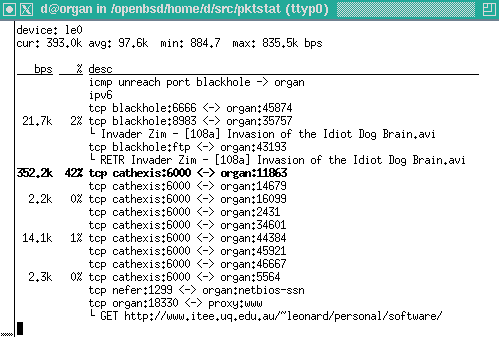
pktstat displays a real-time list of active connections seen on a network interface, and how much bandwidth is being used. Partially decodes HTTP and FTP protocols to show what filename is being transferred. X11 application names are also shown.
pktstat is available in Debian and Ubuntu. So on Ubuntu to install it just type in your terminal:
sudo aptitude install pktstat |
To run pktstat, use the following command (you must be root, or use sudo):
pktstat -i eth0 |
Substitute eth0 with the ethernet card you want to watch, for me for example my wireless connection is on eth1.
Some of the options of pktstat are:
-B Mostra le statistiche in bytes per secondo (Bps) invece che bits per secondo (bps). -F Mostra hostnames completo. Normalmente, gli hostnames sono troncati al primo nome del loro dominio. -i interfaccia * Mostra i dati su questa interfaccia. Se nno viene forniota vieen scelta la prima disponibile. -n Non provare a risolvere i domini o i servizi sulle porte. -p Mostra il totale dei pacchetti invece che il conto in bit. -P Non provare a metetre l'interfaccia in modalità promiscua. -t modalità "Top". Ordina per il conto dei bit(o pacchetti se viene dato -p) invece che per nome -T Mostra il totale dei bit per flusso. -w waittime Aggiorna lo schermo ogni waittime. il default è 5 secondi. |
Popular Posts:
- None Found

hmmm… qui da me ci vogliono:
_sudo_ iptstate
e
_sudo_ pktstat -i eth1
(nel senso che, se non sono superuser, mi rimbalza…)
Ciao, r.
Hai ragione, ho fatto le prove con un terminale di root e non ci ho fatto caso.
Modifico l’articolo.
Grazie
Hi,
I looked for (googled) “pkstat” and I can not find any web site to host it. May you give me the url of this project? Looks very useful.
Thanks,
You missed a t, the name is pktstat.
I’ve not found the main page of the project too, this is his man page: http://linux.die.net/man/1/pktstat
OK, thank you for your correction. I googled again and now I got this link where the source code could be obtained.
http://ftp.debian.org/pool/main/p/pktstat/
It compiled perfectly in my Fedora 13 box.
Thanks again.
see also: iptraf
I suggest using nethogs instead
Nice program, tested and reviewed in a new article http://www.linuxaria.com/pills/nethogs-iptraf-network?lang=en
Thanks for the info.